Appearance#
Appearance ist die Basisklasse von Background und Costume.
Backgrounds und Costumes sind ebenfalls Appearances und erben daher alle in dieser Klasse definierten Attribute und Methoden.
API-Referenz#
- class miniworlds.appearances.appearance.Appearance(*args, **kwargs)[Quellcode]#
Base class for actor costumes and world backgrounds.
Appearanceis the parent class of bothCostume(used by actors) andBackground(used by worlds). You normally do not createAppearanceinstances directly – access them throughactor.costumeorworld.backgroundinstead.Typical operations students use:
Loading an image:
actor.costume.add_image("my_image.png")Setting a fill color:
actor.costume.fill_color = (255, 0, 0)Drawing a border:
actor.costume.border = 2Animating a sprite:
actor.costume.is_animated = TrueMaking transparent:
actor.costume.alpha = 128Flipping horizontally:
actor.costume.is_flipped = True
Öffentliche Datenattribute:
Aktuelle Schriftgröße für das Rendern von Text.
Kachelgröße der Textur, wenn
is_texturedaktiviert ist.Anzahl der Frames zwischen Animationsschritten.
If True, the image is tiled over the background.
If True, costume will be rotated with token direction
Ob Zeichenoperationen auf der Elternposition zentriert sind.
Ob Formen gefüllt statt nur als Kontur gerendert werden.
Flips the costume or background.
Wenn True, wird das Bild unter Beibehaltung des Seitenverhältnisses hochskaliert.
Whether the image is scaled to parent width and keeps aspect ratio.
Whether the image is scaled to parent height and keeps aspect ratio.
Primäre Füllfarbe für formbasiertes Rendering.
Skaliert das Token auf die Größe des übergeordneten Elements, ohne das Seitenverhältnis beizubehalten.
Wenn True, wird das Bild vor der Drehung entsprechend der Ausrichtung des übergeordneten Elements gedreht.
Defines a colored layer.
Defines a transparency.
Transparency value of the appearance.
If True, the costume will be animated.
->Füllfarbe anzeigen
see border color
border color of actor
Die Randgröße des Actors.
Liste der von dieser Appearance verwalteten Bild-Surfaces.
Führt alle Aktionen in der Bildpipeline aus
Dirty-Flag für den aktuellen Zustand der Rendering-Pipeline.
In Unterklassen Kostüm und Hintergrund implementiert
image_managerPublic Methods:
__init__()set_image(source)Legt das angezeigte Bild des Kostüms/Hintergrunds auf den ausgewählten Index fest
Schließt die Initialisierung nach dem Konstruktor-Hook der Metaklasse ab.
set_mode(**kwargs)Setzt mehrere Appearance-Modus-Flags auf einmal.
Gibt alle Modus-Flags als Dictionary zurück.
set_animated(value)Aktiviert oder deaktiviert framebasierte Animation.
flip(value)Hilfsmethode zum Setzen von
is_flipped.Entfernt das zuletzt hinzugefügte Bild.
add_image(source)Fügt eine Bildquelle hinzu und gibt ihren Index zurück.
add_images(sources)Adds multiple images to background/costume.
animate([loop])Animates the costume
the method is overwritten in subclasses costume and appearance
Create an array from costume or background.
from_array(arr)Create a background or costume from array.
fill(value)Set default fill color for borders and lines
set_filled(value)Legt fest, ob Formen gefüllt gerendert werden.
get_color(position)Gibt die Farbe an einer lokalen Pixelposition zurück.
get_rect()Gibt das lokale Rechteck des gerenderten Bildes zurück.
draw(source, position, width, height)Zeichnet eine Bildquelle an einer lokalen Position.
draw_on_image(path, position, width, height)Plant das Zeichnen einer Bilddatei auf das Appearance-Bild ein.
draw_color_on_image(color, position, width, ...)Plant das Zeichnen eines farbigen Rechtecks auf das Appearance-Bild ein.
__str__()Return str(self).
If dirty, the image will be reloaded.
update()Loads the next image, called 1/frame
register(method)Register method for decorator.
draw_shape_append(shape, arguments)Hängt einen Form-Zeichenbefehl an die Render-Warteschlange an.
draw_shape_set(shape, arguments)Ersetzt Form-Zeichenbefehle durch einen einzelnen Befehl.
draw_image_append(surface, rect)Hängt einen Zeichenbefehl für eine vorgerenderte Surface an.
draw_image_set(surface, rect)Ersetzt Bild-Zeichenbefehle durch einen einzelnen Surface-Zeichenbefehl.
set_dirty([value, status])Markiert Pipeline-Stufen als dirty, damit das Bild neu gerendert wird.
In Unterklassen Kostüm und Hintergrund implementiert
Private Data Attributes:
_abc_implPrivate Methods:
_get_rendering_facade()_set_defaults(**kwargs)_set_font(font, font_size)_set_animation_speed(value)_set_textured(value)bool: If True, the image is tiled over the background.
_set_rotatable(value)If set to True, costume will be rotated with actor direction
_set_centered(value)_set_flipped(value)Flips the costume or background.
_set_filled(value)Sets whether the costume or background should be filled with a color.
_set_scaled(value)Setzt den Actor auf die Eltern-Größe ohne das Seitenverhältnis beizubehalten.
_set_upscaled(value)Wenn auf Wahr gesetzt, wird das Bild unter Beibehaltung des Seitenverhältnisses hochskaliert.
_set_scaled_to_width(value)_set_scaled_to_height(value)_set_image(source)Legt das angezeigte Bild des Kostüms/Hintergrunds auf den ausgewählten Index fest
_before_transformation_pipeline()Called in get_image before the image transformation pipeline is processed (e.g. when size, rotation, or other display properties have changed).
_after_transformation_pipeline()Called in get_image after the image transformation pipeline is processed (e.g. when size, rotation, or other display properties have changed).
_load_image()Loads the image,
_update_draw_shape()_inner_shape()Returns inner shape of costume
_outer_shape()Returns outer shape of costume
_inner_shape_arguments()Gets arguments for inner shape.
_outer_shape_arguments()Gets arguments for outer shape
- LOAD_NEW_IMAGE = 2#
- RELOAD_ACTUAL_IMAGE = 1#
- add_image(source)[Quellcode]#
Fügt eine Bildquelle hinzu und gibt ihren Index zurück.
- Rückgabetyp:
- add_images(sources)[Quellcode]#
Adds multiple images to background/costume.
Each source in sources must be a valid input for add_image.
- after_animation()[Quellcode]#
the method is overwritten in subclasses costume and appearance
Beispiele
Der Actor wird nach der Animation entfernt - Dies kann für Explosionen verwendet werden.
from miniworlds import *

world = World()
actor = Actor()
costume = actor.add_costume("images/1.png")
costume.add_image("images/2.png")
costume.animate()
@costume.register
def after_animation(self):
    self.parent.remove()

world.run()
- after_init()[Quellcode]#
Schließt die Initialisierung nach dem Konstruktor-Hook der Metaklasse ab.
- property alpha#
Transparency value of the appearance.
Use values from 0 to 255: - 0 means fully transparent - 255 means fully visible
If the value is between 0 and 1, it is interpreted as a normalized opacity and converted to the 0..255 range.
- animate(loop=False)[Quellcode]#
Animates the costume
- Parameter:
loop – Wenn loop = True ist, wird die Animation als Schleife verarbeitet. (Sie können dies mit self.loop stoppen)
from miniworlds import *

world = World(80,40)

robo = Actor()
robo.costume.add_images(["images/1.png"])
robo.costume.add_images(["images/2.png","images/3.png","images/4.png"])
robo.costume.animation_speed = 20
robo.costume.is_animated = True
world.run()
- property animation_speed#
Anzahl der Frames zwischen Animationsschritten.
- property border#
Die Randgröße des Actors.
Der Wert ist 0, wenn der Actor keinen Rand hat
- Rückgabe:
int
- Rückgabetyp:
_type_
- property border_color#
border color of actor
- property color#
->Füllfarbe anzeigen
- property coloring#
Defines a colored layer.
coloringkann True oder false sein. Die Farbe wird durch das Attributappearance.colordefiniert.
- counter = 0#
- property dirty#
Dirty-Flag für den aktuellen Zustand der Rendering-Pipeline.
- draw(source, position, width, height)[Quellcode]#
Zeichnet eine Bildquelle an einer lokalen Position.
- draw_color_on_image(color, position, width, height)[Quellcode]#
Plant das Zeichnen eines farbigen Rechtecks auf das Appearance-Bild ein.
- draw_image_append(surface, rect)[Quellcode]#
Hängt einen Zeichenbefehl für eine vorgerenderte Surface an.
- draw_image_set(surface, rect)[Quellcode]#
Ersetzt Bild-Zeichenbefehle durch einen einzelnen Surface-Zeichenbefehl.
- draw_on_image(path, position, width, height)[Quellcode]#
Plant das Zeichnen einer Bilddatei auf das Appearance-Bild ein.
- draw_shape_append(shape, arguments)[Quellcode]#
Hängt einen Form-Zeichenbefehl an die Render-Warteschlange an.
- draw_shape_set(shape, arguments)[Quellcode]#
Ersetzt Form-Zeichenbefehle durch einen einzelnen Befehl.
- fill(value)[Quellcode]#
Set default fill color for borders and lines
- property fill_color#
Primäre Füllfarbe für formbasiertes Rendering.
- flip(value)[Quellcode]#
Hilfsmethode zum Setzen von
is_flipped.
- property font_size#
Aktuelle Schriftgröße für das Rendern von Text.
- from_array(arr)[Quellcode]#
Erstellen Sie einen Hintergrund oder ein Kostüm aus einem Array. Das Array muss ein
numpy.ndarraysein, das mit.to_colors_arrayerstellt werden kannBeispiele
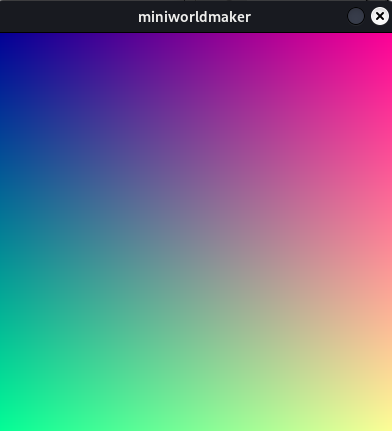
Konvertiere grauen Standardhintergrund in einen Farbverlauf
from miniworlds import *

world = World()
arr = world.background.to_colors_array()
for x in range(len(arr)):
    for y in range(len(arr[0])):
        arr[x][y][0] = ((x +1 ) / world.width) * 255
        arr[x][y][1] = ((y +1 ) /world.width) * 255
world.background.from_array(arr)
world.run()


world.background.from_array(arr)
world.run()
Ausgabe:
- get_color(position)[Quellcode]#
Gibt die Farbe an einer lokalen Pixelposition zurück.
- get_image()[Quellcode]#
Wenn verschmutzt, wird das Bild neu geladen. Die Bildpipeline wird verarbeitet, definiert durch “set_dirty”
- abstract get_manager()[Quellcode]#
In Unterklassen Kostüm und Hintergrund implementiert
- get_modes()[Quellcode]#
Gibt alle Modus-Flags als Dictionary zurück.
- get_rect()[Quellcode]#
Gibt das lokale Rechteck des gerenderten Bildes zurück.
- property image: Surface#
Führt alle Aktionen in der Bildpipeline aus
- property images#
Liste der von dieser Appearance verwalteten Bild-Surfaces.
- property is_animated#
If True, the costume will be animated.
from miniworlds import *

world = World(80,40)

robo = Actor()
robo.costume.add_images(["images/1.png"])
robo.costume.add_images(["images/2.png","images/3.png","images/4.png"])
robo.costume.animation_speed = 20
robo.costume.is_animated = True
world.run()
- property is_centered#
Ob Zeichenoperationen auf der Elternposition zentriert sind.
- property is_filled#
Ob Formen gefüllt statt nur als Kontur gerendert werden.
- property is_flipped#
Spiegelt das Kostüm oder den Hintergrund. Das Bild wird über die y-Achse des Kostüms/Hintergrunds gespiegelt.
Beispiele
Flippt Actor:
from miniworlds import *

world = World()
token = Token()
token.add_costume("images/alien1.png")
token.height= 400
token.width = 100
token.is_rotatable = False
@token.register
def act(self):
    if self.world.frame % 100 == 0:
        if self.costume.is_flipped:
            self.costume.is_flipped = False
        else:
            self.costume.is_flipped = True
world.run()


- property is_rotatable#
If True, costume will be rotated with token direction
- property is_scaled#
Skaliert das Token auf die Größe des übergeordneten Elements, ohne das Seitenverhältnis beizubehalten.
- property is_scaled_to_height#
Whether the image is scaled to parent height and keeps aspect ratio.
- property is_scaled_to_width#
Whether the image is scaled to parent width and keeps aspect ratio.
- property is_textured#
If True, the image is tiled over the background.
Beispiele
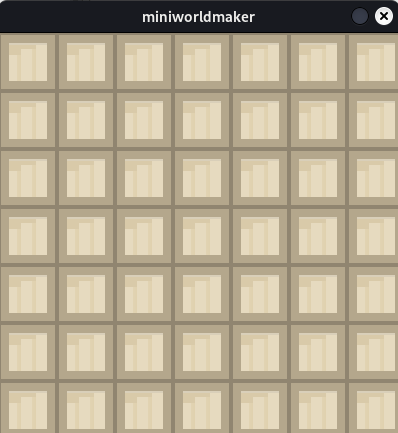
Texturiere das Brett mit dem gegebenen Bild:
from miniworlds import *

world = World()
background = world.add_background("images/stone.png")
background.is_textured = True
world.run()
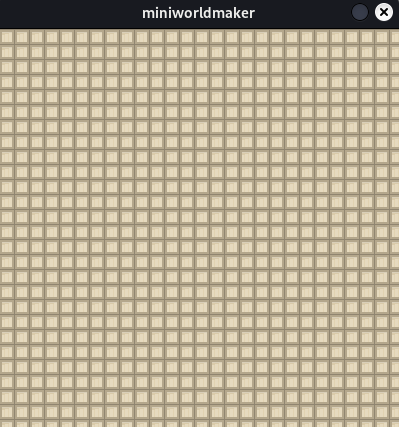
Texturgröße festlegen
from miniworlds import *

world = World()
background = world.add_background("images/stone.png")
background.is_textured = True
background.texture_size = (15,15)
world.run()
- Typ:
- property is_upscaled#
Wenn True, wird das Bild unter Beibehaltung des Seitenverhältnisses hochskaliert.
- property orientation#
Wenn True, wird das Bild vor der Drehung entsprechend der Ausrichtung des übergeordneten Elements gedreht.
Beispiele
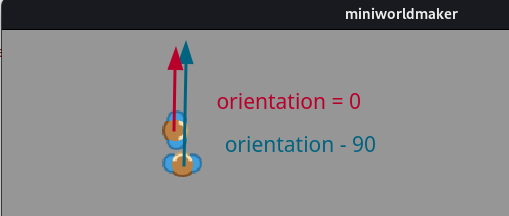
Beide Actor steigen auf. Das Bild von t2 ist korrekt ausgerichtet. t1 schaut in die falsche Richtung.
from miniworlds import *

world = TiledWorld()

t1 = Actor((4,4))
t1.add_costume("images/player.png")
t1.move()

t2 = Actor((4,5))
t2.add_costume("images/player.png")
t2.orientation = - 90
t2.move()

@t1.register
def act(self):
    self.move()

@t2.register
def act(self):
    self.move()

world.run()
- Typ:
- register(method)[Quellcode]#
Registriere Methode für Dekorator. Registriert Methode für Actor oder Hintergrund.
- remove_last_image()[Quellcode]#
Entfernt das zuletzt hinzugefügte Bild.
- set_animated(value)[Quellcode]#
Aktiviert oder deaktiviert framebasierte Animation.
- set_dirty(value='all', status=1)[Quellcode]#
Markiert Pipeline-Stufen als dirty, damit das Bild neu gerendert wird.
- set_filled(value)[Quellcode]#
Legt fest, ob Formen gefüllt gerendert werden.
- set_image(source)[Quellcode]#
Legt das angezeigte Bild des Kostüms/Hintergrunds auf den ausgewählten Index fest
- Rückgabetyp:
- Parameter:
source – Der Bildindex oder ein Bild.
- Rückgabe:
Wahr, wenn der Bildindex existiert
Beispiele
Fügen Sie zwei Bilder zum Hintergrund hinzu und wechseln Sie zu Bild 2
from miniworlds import *

world = World()
background = world.add_background("images/1.png")
background.add_image("images/2.png")
background.set_image(1)
world.run()
- set_mode(**kwargs)[Quellcode]#
Setzt mehrere Appearance-Modus-Flags auf einmal.
Unterstützte Schlüsselwortargumente sind
mode,texture_sizeundanimation_speed.
- property stroke_color#
see border color
- property texture_size#
Kachelgröße der Textur, wenn
is_texturedaktiviert ist.
- to_colors_array()[Quellcode]#
Erstelle ein Array aus Kostüm oder Hintergrund. Das Array kann mit
.from_arrayin ein Appearance umgeschrieben werdenExamples: :rtype:
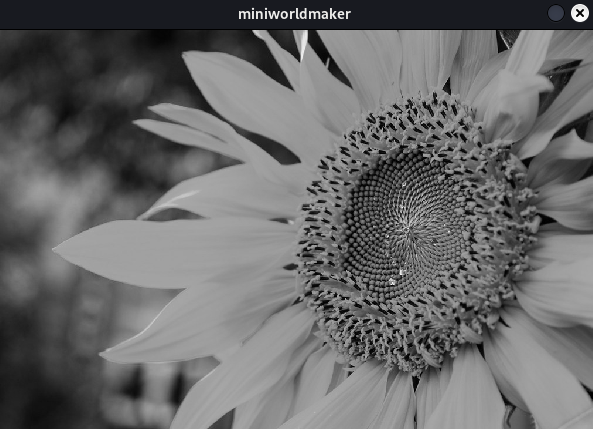
ndarrayEin Hintergrundbild in Graustufen umwandeln
from miniworlds import *

world = World(600,400)
world.add_background("images/sunflower.jpg")
arr = world.background.to_colors_array()

def brightness(r, g, b):
    return (int(r) + int(g) + int(b)) / 3

for x in range(len(arr)):
    for y in range(len(arr[0])):
        arr[x][y] = brightness(arr[x][y][0], arr[x][y][1], arr[x][y][2])

world.background.from_array(arr)
world.run()
Ausgabe:
- property transparency#
Defines a transparency.
Wenn
transparencyTrueist, wird der Transparenzwert durch das Attributappearance.alphadefiniert
- update()[Quellcode]#
Loads the next image, called 1/frame